
Reviews
Description
Game Introduction
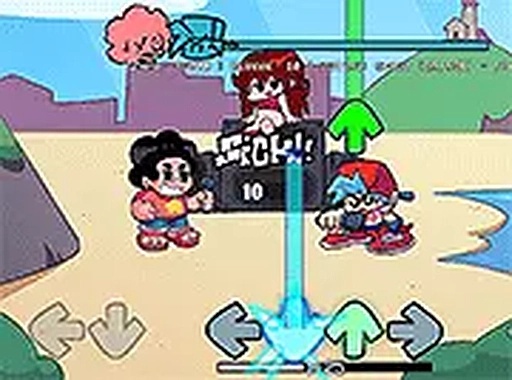
This fan-made rhythm game is inspired by the popular animated series Steven Universe. Players join Steven and his friends at a cheerful beach party where they take part in musical performances. The game combines the charm of the cartoon with the core mechanics of a rhythm game, offering original songs and bright, colorful visuals. It is designed for desktop browsers and requires no installation or registration, making it easy to start playing. The main objective is to match notes and keep up with the beat as the music becomes more challenging. The game captures the fun and energy of a beach party, with characters from the show appearing in lively animations. It is a free, browser-based experience that appeals to fans of the series and rhythm game enthusiasts alike.
How to Play
Players use their keyboard to press arrow keys that appear on the screen. Each arrow corresponds to a note in the song, and the goal is to press the correct key when the note reaches a target area. Successfully hitting notes scores points and keeps the performance going. The game increases in speed and difficulty as players progress through songs. Settings allow adjustments to volume and game speed, and pressing the escape key pauses the action. For the best experience, playing in full screen mode on a computer with a stable internet connection is recommended.
Game Features
The game includes multiple songs with unique rhythms that reflect the style of the show. Each character has distinct animations and moves. The visuals are bright and match the beach party theme. The game is free to play and runs directly in a web browser without downloads. It supports full screen mode for an immersive experience. Controls are simple and easy to learn, making it suitable for players of all ages. The mod offers a fun way to enjoy music from the Steven Universe world while testing timing and reflexes.
Tips for Success
Practice regularly to improve your timing and accuracy. Start with easier songs to get comfortable with the rhythm before moving to faster tracks. Pay attention to the beat and try to anticipate note patterns. Adjust the game speed in settings if needed to match your skill level. Staying relaxed and focusing on the target area can help reduce mistakes. If you miss notes, don't get discouraged—keep playing to build muscle memory. Using full screen mode can minimize distractions and help you concentrate on the gameplay.
Compatibility
Related Titles
Carol's Office Date Prep Game
A clever, lighthearted timing game with a funny office theme. Simple controls and colorful graphics make it a delightful break.
Holiday Helper Christmas Quest
A delightful holiday arcade game with simple controls and a heartwarming mission to help Santa.
Pumpkin Dash Arcade
Bright, cheerful arcade fun for all ages. Simple controls and increasing challenges make it perfect for quick breaks.
Kitten Coloring Fun Game
A safe, ad-free coloring game with cute kittens and bright colors. Perfect for creative kids.

Gentle Whale Happiness Game
A charming, relaxing game that spreads joy through simple touch interactions. Perfect for quick breaks.
Heights Beat Rhythm Game
A cheerful rhythm game with catchy Roblox-themed songs. Easy to learn and fun for all ages.
Friday Night Tunes Rhythm Game
A fun, free browser rhythm game with spooky characters and challenging music patterns. Great for music game fans.
Sprunki Music Mix Creator
A fun, creative music game that is safe for all ages and easy to play online.
Melania Hat Playful Game
A delightful, stress-free game where clicks bring smiles. Perfect for kids and anyone needing a quick, cheerful break.

Childrens Digital Coloring Art Game
A safe, ad-free digital coloring game that encourages creativity and self-expression in young children.